This is part 2 of a series on provisioning a Kubernetes cluster in AWS using HashiCorp Terraform. Part 1 covered the VPC — the isolated virtual network that hosts the cluster. This part covers identity: defining the IAM roles and policies that allow EKS to manage AWS resources on your behalf, then using those roles to provision the control plane and a managed node group.
The guide assumes familiarity with the VPC setup from part 1 and a basic understanding of Kubernetes concepts (control plane, worker nodes, pods).
Define IAM roles
Control plane and data plane IAM roles need to be defined. One can imagine an IAM role as an entry card with a name on it.
Principal is allowed to perform a defined action — in this case, assume the role. Assuming an empty role does not have much meaning — like the entry card, until an IT administrator defines which doors can be opened with it, it is just an antenna inside a piece of plastic.
# Tells: 'eks.amazonaws.com' can assume eks-cluster-role
# Needed for control plane
resource "aws_iam_role" "eks-cluster-role" {
    assume_role_policy = jsonencode(
        {
            Version = "2012-10-17",
            Statement = [{
                Effect = "Allow"
                Action = "sts:AssumeRole" # What
                Principal = {Service = "eks.amazonaws.com"} # Who
            }]
        })
}

# Needed for data plane
resource "aws_iam_role" "eks-worker-role" {
    assume_role_policy = jsonencode(
        {
            Version = "2012-10-17",
            Statement = [{
                Effect = "Allow"
                Action = "sts:AssumeRole" # What
                Principal = {Service = "ec2.amazonaws.com"} # Who
            }]
        })
}
Visualization of generated resources:
graph LR
    EKSSvc["eks.amazonaws.com"]
    EC2Svc["ec2.amazonaws.com"]
    CPRole["eks-cluster-role"]
    WKRole["eks-worker-role"]

    EKSSvc -->|"AssumeRole"| CPRole
    EC2Svc -->|"AssumeRole"| WKRole

style EKSSvc fill:#FFF3E0,stroke:#FF9900,stroke-width:2px
style EC2Svc fill:#FFF3E0,stroke:#FF9900,stroke-width:2px
style CPRole fill:#B6D0E2,stroke:#9E9E9E,stroke-width:1px
style WKRole fill:#B6D0E2,stroke:#9E9E9E,stroke-width:1px
Attach a policy for control plane
One must remember that the EKS control plane is not a resource that runs in an administrator-defined VPC — it runs on AWS’s own infrastructure and needs to be given permissions to manage resources. AmazonEKSClusterPolicy gives the control plane permission to do things like:
- Create network interfaces in your VPC — the control plane needs to attach an ENI (Elastic Network Interface) into your subnets so it can communicate with your worker nodes. Without this, it can’t talk to the nodes at all.
- Describe EC2 resources — it needs to understand your VPC topology, subnets, and routing to make intelligent scheduling decisions.
- Write CloudWatch logs — for control plane audit logging.
# Tells: eks-cluster-role can use AmazonEKSClusterPolicy
# AmazonEKSClusterPolicy -  provides Kubernetes the permissions it requires to manage resources on your behalf
resource "aws_iam_role_policy_attachment" "eks-control-policy" {
  role = aws_iam_role.eks-cluster-role.name
  policy_arn = "arn:aws:iam::aws:policy/AmazonEKSClusterPolicy"
}
Visualization of generated resources:
graph LR
    EKSSvc["eks.amazonaws.com"]
    EC2Svc["ec2.amazonaws.com"]
    CPRole["eks-cluster-role"]
    WKRole["eks-worker-role"]
    CPPolicy["AmazonEKSClusterPolicy"]

    EKSSvc -->|"AssumeRole"| CPRole
    EC2Svc -->|"AssumeRole"| WKRole
    CPRole -->|"attached"| CPPolicy

style EKSSvc fill:#FFF3E0,stroke:#FF9900,stroke-width:2px
style EC2Svc fill:#FFF3E0,stroke:#FF9900,stroke-width:2px
style CPRole fill:#B6D0E2,stroke:#9E9E9E,stroke-width:1px
style WKRole fill:#A9A9A9,stroke:#9E9E9E,stroke-width:1px
style CPPolicy fill:#B6D0E2,stroke:#9E9E9E,stroke-width:1px
Attach a policy for worker nodes
Next, the data plane policies can be defined and attached to the eks-worker-role:
- AmazonEKSWorkerNodePolicy — lets the node register itself with the control plane and describe EC2/EKS resources around it. Without it, the node boots up but the cluster never knows it exists.
- AmazonEKS_CNI_Policy — lets the CNI plugin allocate real VPC IP addresses for pods by creating/attaching network interfaces on the node. Without it, pods start with no IP and can’t communicate.
- AmazonEC2ContainerRegistryReadOnly — lets the node pull container images from ECR. Needed even if your app isn’t on ECR, because EKS system components (CoreDNS, kube-proxy) pull their images from ECR.
resource "aws_iam_role_policy_attachment" "eks-worker-node-policy" {
  role = aws_iam_role.eks-worker-role.name
  policy_arn = "arn:aws:iam::aws:policy/AmazonEKSWorkerNodePolicy"
}
resource "aws_iam_role_policy_attachment" "eks-worker-cni-policy" {
  role = aws_iam_role.eks-worker-role.name
  policy_arn = "arn:aws:iam::aws:policy/AmazonEKS_CNI_Policy"
}
# Even if your own application never touches ECR, the node still needs to pull system images from ECR
resource "aws_iam_role_policy_attachment" "eks-worker-registry-policy" {
  role = aws_iam_role.eks-worker-role.name
  policy_arn = "arn:aws:iam::aws:policy/AmazonEC2ContainerRegistryReadOnly"
}
Visualization of generated resources:
graph LR
    EKSSvc["eks.amazonaws.com"]
    EC2Svc["ec2.amazonaws.com"]
    CPRole["eks-cluster-role"]
    WKRole["eks-worker-role"]
    CPPolicy["AmazonEKSClusterPolicy"]
    WNPolicy["AmazonEKSWorkerNodePolicy"]
    CNIPolicy["AmazonEKS_CNI_Policy"]
    RegPolicy["AmazonEC2ContainerRegistryReadOnly"]

    EKSSvc -->|"AssumeRole"| CPRole
    EC2Svc -->|"AssumeRole"| WKRole
    CPRole -->|"attached"| CPPolicy
    WKRole -->|"attached"| WNPolicy
    WKRole -->|"attached"| CNIPolicy
    WKRole -->|"attached"| RegPolicy

style EKSSvc fill:#FFF3E0,stroke:#FF9900,stroke-width:2px
style EC2Svc fill:#FFF3E0,stroke:#FF9900,stroke-width:2px
style CPRole fill:#A9A9A9,stroke:#9E9E9E,stroke-width:1px
style CPPolicy fill:#A9A9A9,stroke:#9E9E9E,stroke-width:1px
style WKRole fill:#B6D0E2,stroke:#9E9E9E,stroke-width:1px
style WNPolicy fill:#B6D0E2,stroke:#9E9E9E,stroke-width:1px
style CNIPolicy fill:#B6D0E2,stroke:#9E9E9E,stroke-width:1px
style RegPolicy fill:#B6D0E2,stroke:#9E9E9E,stroke-width:1px
Create EKS control plane
The control plane is an AWS-managed API endpoint.
It must reference subnets from both the private and public ranges — private subnets for worker nodes, public subnets for future load balancers.
The cluster must also be given the cluster role via role_arn.
# Create control plane
resource "aws_eks_cluster" "cluster-eu-1" {
  name = "cluster-eu-1"
  role_arn = aws_iam_role.eks-cluster-role.arn
  vpc_config { # Nested block that tells EKS which subnets to use
    subnet_ids = [
      aws_subnet.kubernetes-private-1a.id,
      aws_subnet.kubernetes-private-1b.id,
      aws_subnet.kubernetes-public-1a.id,
      aws_subnet.kubernetes-public-1b.id
      ]
    }
}
Create EKS data plane
Define the data plane. Administrators can choose whether they want to run EC2 nodes or use AWS Fargate to run their workloads.
- EC2 (Managed Node Groups) — used in this example. The administrator chooses the instance type, and AWS manages the node lifecycle (launching, draining, and replacing nodes during upgrades). The OS is visible to the instance owner.
- Fargate — serverless. The administrator defines a pod, and AWS runs it on infrastructure the cluster owner never sees or manages. No nodes, no EC2, no SSH. The tradeoff is losing some control — no DaemonSets, no GPU, no privileged containers.
The node_role_arn attribute wires the node group to the data plane IAM role defined earlier.
# Data plane
resource "aws_eks_node_group" "cluster-eu-1" {
  cluster_name = aws_eks_cluster.cluster-eu-1.name
  node_role_arn = aws_iam_role.eks-worker-role.arn
  subnet_ids = [aws_subnet.kubernetes-private-1a.id,
  aws_subnet.kubernetes-private-1b.id]
  scaling_config {
    desired_size = 2
    min_size = 2
    max_size = 2
  }
  # Use `t3.small` for free tier
  instance_types = ["t3.medium"]
}
Visualization of generated resources:
graph TB
    subgraph AWSManaged["AWS Managed Infrastructure"]
        CP["EKS Control Plane<br/>cluster-eu-1"]
    end

    subgraph AWS["AWS eu-central-1"]
        subgraph VPC["VPC (10.0.0.0/16)"]
            subgraph AZ1a["Availability Zone 1a"]
                PubSub1a["🌐 Public Subnet<br/>10.0.101.0/24"]
                subgraph PrivSub1a["🔒 Private Subnet 10.0.201.0/24"]
                    Node1["Worker Node<br/>t3.medium"]
                end
            end
            subgraph AZ1b["Availability Zone 1b"]
                PubSub1b["🌐 Public Subnet<br/>10.0.102.0/24"]
                subgraph PrivSub1b["🔒 Private Subnet 10.0.202.0/24"]
                    Node2["Worker Node<br/>t3.medium"]
                end
            end
        end
    end

    CP -->|"Elastic Network Interface"| Node1
    CP -->|"Elastic Network Interface"| Node2

style AWSManaged fill:#E8F5E9,stroke:#388E3C,stroke-width:2px
style CP fill:#A9A9A9,stroke:#9E9E9E,stroke-width:1px
style AWS fill:#FFF3E0,stroke:#FF9900,stroke-width:2px
style VPC fill:#F3E5F5,stroke:#7B1FA2,stroke-width:2px
style AZ1a fill:#F5F5F5,stroke:#9E9E9E,stroke-width:1px
style AZ1b fill:#F5F5F5,stroke:#9E9E9E,stroke-width:1px
style PubSub1a fill:#A9A9A9,stroke:#9E9E9E,stroke-width:1px
style PubSub1b fill:#A9A9A9,stroke:#9E9E9E,stroke-width:1px
style PrivSub1a fill:#A9A9A9,stroke:#9E9E9E,stroke-width:1px
style PrivSub1b fill:#A9A9A9,stroke:#9E9E9E,stroke-width:1px
style Node1 fill:#B6D0E2,stroke:#9E9E9E,stroke-width:1px
style Node2 fill:#B6D0E2,stroke:#9E9E9E,stroke-width:1px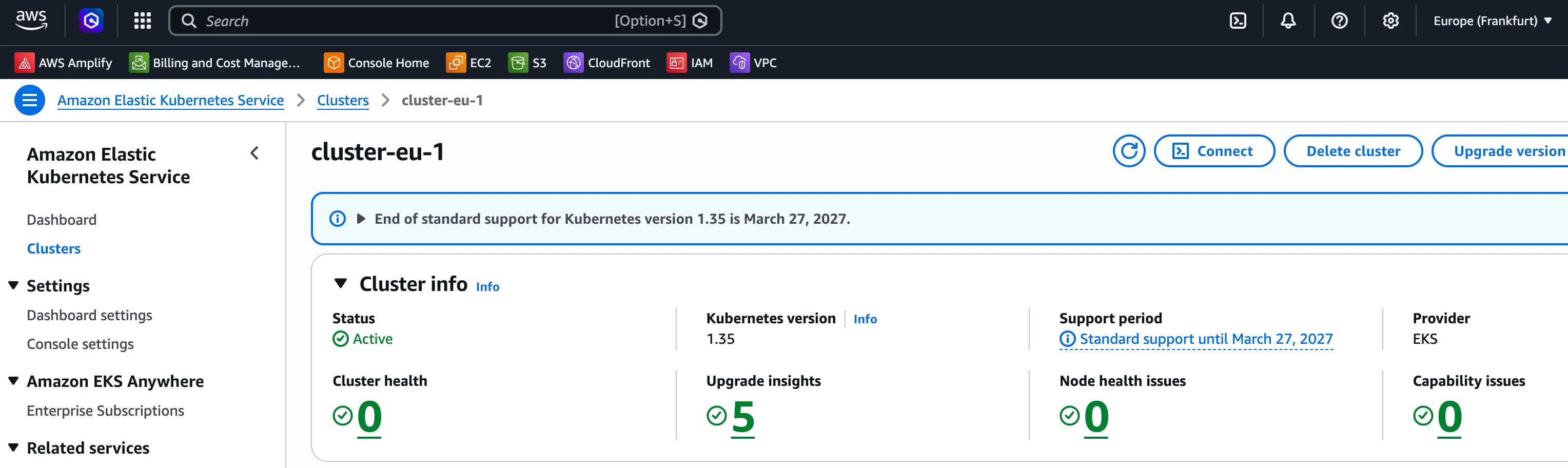
Complete HCL file
# Tells: 'eks.amazonaws.com' can assume eks-cluster-role
# Needed for control plane
resource "aws_iam_role" "eks-cluster-role" {
    assume_role_policy = jsonencode(
        {
            Version = "2012-10-17",
            Statement = [{
                Effect = "Allow"
                Action = "sts:AssumeRole" # What
                Principal = {Service = "eks.amazonaws.com"} # Who
            }]
        })
}

# Needed for data plane
resource "aws_iam_role" "eks-worker-role" {
    assume_role_policy = jsonencode(
        {
            Version = "2012-10-17",
            Statement = [{
                Effect = "Allow"
                Action = "sts:AssumeRole" # What
                Principal = {Service = "ec2.amazonaws.com"} # Who
            }]
        })
}

# Tells: eks-cluster-role can use AmazonEKSClusterPolicy
# AmazonEKSClusterPolicy: 'This policy provides Kubernetes the permissions it requires to manage resources on your behalf'
resource "aws_iam_role_policy_attachment" "eks-control-policy" {
  role = aws_iam_role.eks-cluster-role.name
  policy_arn = "arn:aws:iam::aws:policy/AmazonEKSClusterPolicy"
}

# Data plane policies
resource "aws_iam_role_policy_attachment" "eks-worker-node-policy" {
  role = aws_iam_role.eks-worker-role.name
  policy_arn = "arn:aws:iam::aws:policy/AmazonEKSWorkerNodePolicy"
}
resource "aws_iam_role_policy_attachment" "eks-worker-cni-policy" {
  role = aws_iam_role.eks-worker-role.name
  policy_arn = "arn:aws:iam::aws:policy/AmazonEKS_CNI_Policy"
}
# Even if your own application never touches ECR, the node still needs to pull system images from ECR
resource "aws_iam_role_policy_attachment" "eks-worker-registry-policy" {
  role = aws_iam_role.eks-worker-role.name
  policy_arn = "arn:aws:iam::aws:policy/AmazonEC2ContainerRegistryReadOnly"
}

# Create control plane
resource "aws_eks_cluster" "cluster-eu-1" {
  name = "cluster-eu-1"
  role_arn = aws_iam_role.eks-cluster-role.arn
  vpc_config { # Nested block that tells EKS which subnets to use
    subnet_ids = [
      aws_subnet.kubernetes-private-1a.id,
      aws_subnet.kubernetes-private-1b.id,
      aws_subnet.kubernetes-public-1a.id,
      aws_subnet.kubernetes-public-1b.id
      ]
    }
}

# Data plane
resource "aws_eks_node_group" "cluster-eu-1" {
  cluster_name = aws_eks_cluster.cluster-eu-1.name
  node_role_arn = aws_iam_role.eks-worker-role.arn
  subnet_ids = [aws_subnet.kubernetes-private-1a.id,
  aws_subnet.kubernetes-private-1b.id]
  scaling_config {
    desired_size = 2
    min_size = 2
    max_size = 2
  }
  instance_types = ["t3.medium"]
}
Run a sample application
Use the AWS CLI on your local machine to import the ~/.kube/config
aws eks update-kubeconfig --region eu-central-1 --name cluster-eu-1Test connection by running:
kubectl get nodes
[user@machine ~]# kubectl get nodes
NAME                                           STATUS   ROLES    AGE   VERSION
ip-10-0-201-15.eu-central-1.compute.internal   Ready    <none>   16m   v1.35.5-eks-3385e9b
ip-10-0-202-8.eu-central-1.compute.internal    Ready    <none>   16m   v1.35.5-eks-3385e9b
Create a sample NGINX deployment:
kubectl create deployment nginx --image=nginxPort-forward to localhost and test:
kubectl port-forward deployment/nginx 8080:80[user@machine ~]# curl localhost:8080
<!DOCTYPE html>
<html>
<head>
<title>Welcome to nginx!</title>
<style>
html { color-scheme: light dark; }
body { width: 35em; margin: 0 auto;
font-family: Tahoma, Verdana, Arial, sans-serif; }
</style>
</head>
<body>
<h1>Welcome to nginx!</h1>
<p>If you see this page, nginx is successfully installed and working.
Further configuration is required for the web server, reverse proxy,
API gateway, load balancer, content cache, or other features.</p>
<p>For online documentation and support please refer to
<a href="https://nginx.org/">nginx.org</a>.<br/>
To engage with the community please visit
<a href="https://community.nginx.org/">community.nginx.org</a>.<br/>
For enterprise grade support, professional services, additional
security features and capabilities please refer to
<a href="https://f5.com/nginx">f5.com/nginx</a>.</p>
<p><em>Thank you for using nginx.</em></p>
</body>
</html>terraform apply provisions the full stack: two IAM roles with their attached policies, the managed EKS control plane, and two t3.medium worker nodes in the private subnets — confirmed working with the nginx response above.
Do not forget to run terraform destroy when you are done testing for the day.